_31a3beb1-aff4-4cea-8b79-cd982df89a22.png)
Purpose and Overview
The Brand Performance dashboard measures the overall impact of your corporate social media activities. It aggregates results across all connected channels to show how your brand‑authored posts perform and how employee advocacy contributes to those results. A date range selector at the top allows you to analyze specific periods, and a Print as PDF option exports the report for stakeholders.
Key Metrics
-
Earned Media Value (EMV) – A monetary estimate of what it would cost to achieve the same reach through paid advertising. MarketBeam calculates EMV using the cost‑per‑click (CPC) values defined in Settings.
-
Followers Gained – The number of new followers across connected company pages during the selected period.
-
Impressions – The total number of times your posts were displayed to users. Impressions indicate the scale of your content’s visibility.
-
Clicks – The number of times users clicked links in your posts. Clicks often correlate with traffic to your website.
Below the summary tiles, a table breaks down the number of followers, posts, impressions, clicks and click‑through rate (CTR) by month. This helps you spot trends and compare months side‑by‑side.
Visualizations
-
Followers Growth – A line chart plots growth in the company’s follower count over time. Use it to identify spikes after campaigns or announcements.
-
Brand vs. Employee Performance – This chart compares impressions or clicks generated by brand posts with those generated by employee shares. It demonstrates the importance of employee advocacy by visualizing their contribution.
-
Impressions and Clicks – Two separate line charts display impressions and clicks across the date range. Peaks indicate content resonating with audiences, while dips signal less effective periods.
-
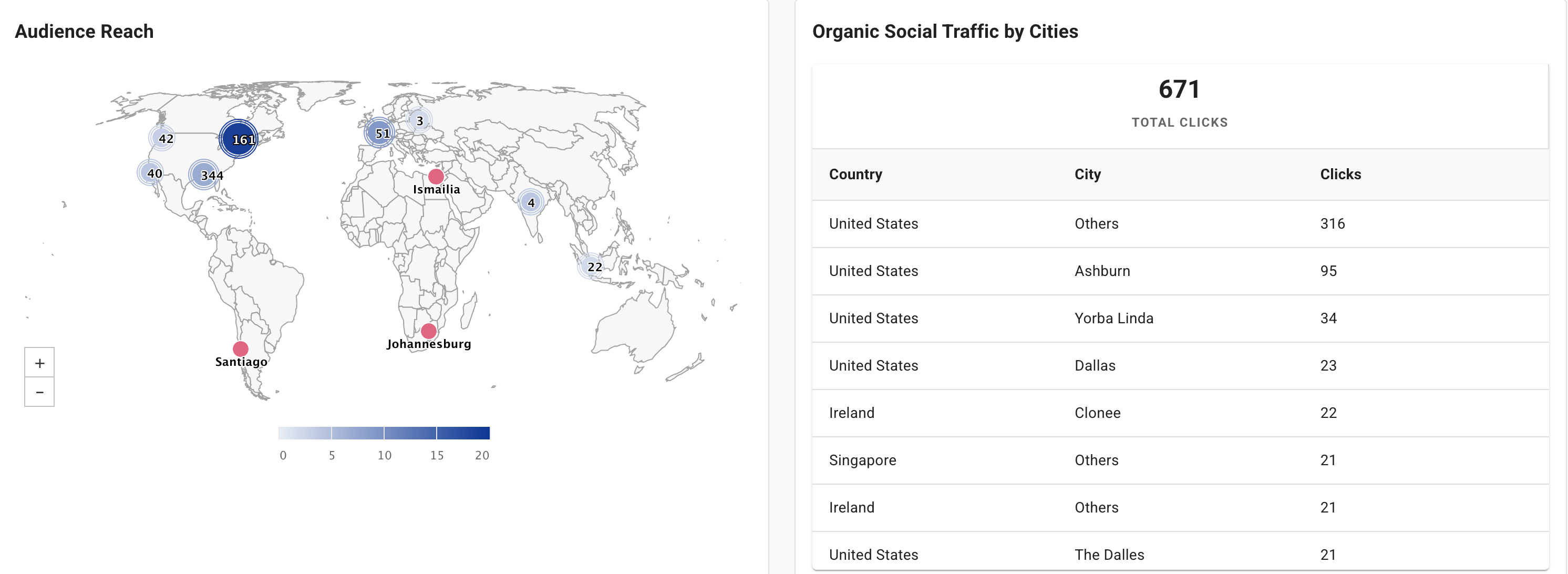
Audience Reach Map – A world map highlights where your audience is located. Darker regions indicate higher reach. A companion table lists the top cities by organic traffic, allowing you to tailor content to key markets. The map can be drilled down to see audiences in individual cities.
Using the Page
-
Select the Date Range – Use the date picker to choose daily, monthly or custom ranges. Metrics and charts update instantly.
-
Interpret Metrics – Review EMV, followers, impressions and clicks to gauge campaign success. If followers and impressions are increasing but clicks remain flat, you may need stronger calls to action.
-
Compare Brand vs. Employee Impact – Encourage advocacy by sharing the Brand vs. Employee Performance chart internally. Demonstrating employee contributions can motivate wider participation.
-
Analyze Geographic Reach – Use the world map and city list to identify unexpected regions of engagement. Adjust content or language to better serve those audiences.
-
Export the Report – Click Print as PDF to share the dashboard with executives or clients. The PDF includes the same metrics and charts for offline review.